Get notified when a kiosk iPad stops checking in, so you can fix WiFi, power or app issues before you miss feedback.
Check device status
Go to Survey Kiosk > Device. Each device shows its Status and Last Seen time. You can filter by status or by how long since the device was last seen.
Set up an offline alert
- Log in at app.surveystance.com.
- In the left sidebar under Survey Kiosk, open Notifications and click Device Offline.
- Add a new device notification.
- Under Device, select the device(s) to monitor.
- Under Offline More Than, choose how long a device must be offline before you're alerted.
- Choose a Reminder Frequency.
- Choose how to be notified: Via Email, Via SMS and/or Via Webhook.
- Click Submit.
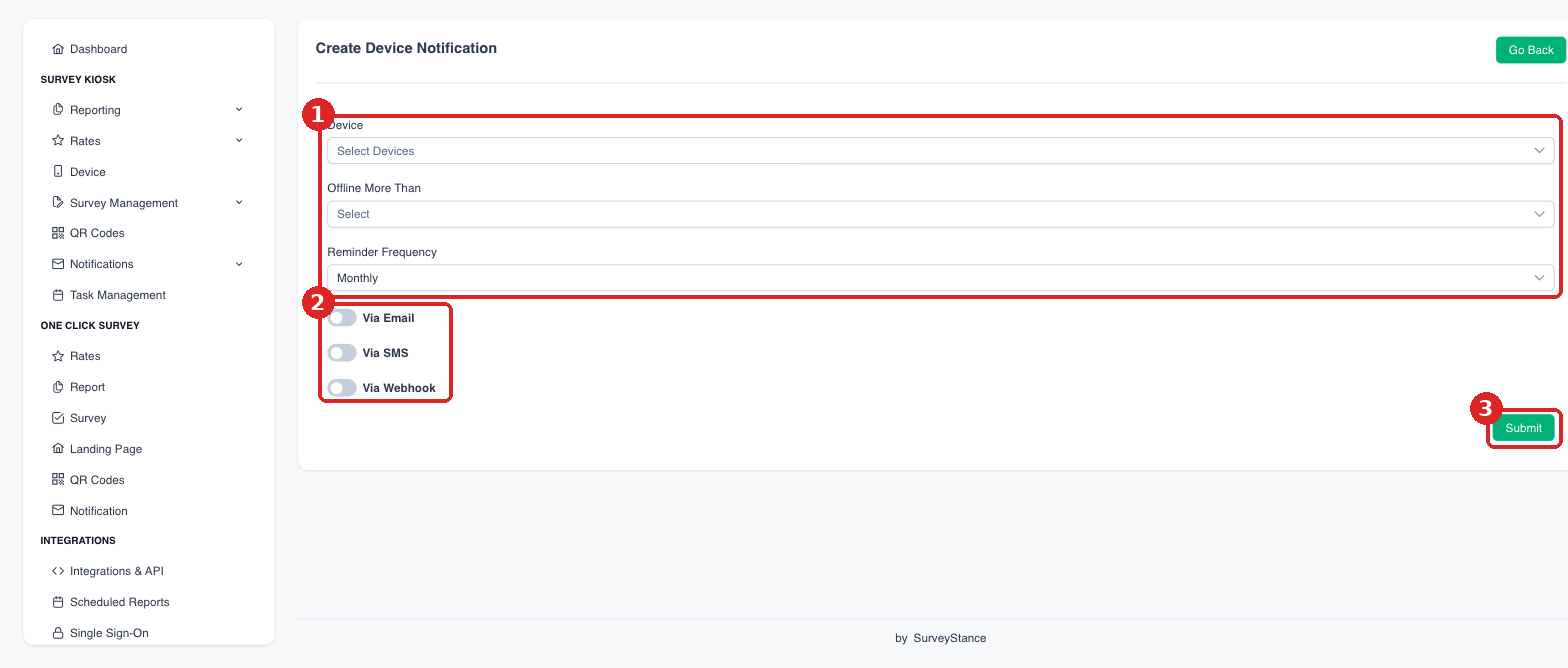
(1) Choose the devices, how long offline, and how often to remind you. (2) Pick Email, SMS and/or Webhook. (3) Click Submit.
If a device goes offline, see Checking iPad WiFi Connectivity and General Troubleshooting iPad App Issues.