The Integrations & API page is where you get your SurveyStance API key and connect third-party apps.
Get your API key
- Log in at app.surveystance.com.
- In the left sidebar under Integrations, click Integrations & API.
- Request your SurveyStance API Gateway Key (x-api-key). We'll email the primary admin when the key is ready.
- Once active, click Copy to copy your key. You can also click Regenerate x-api-key if it's ever exposed.
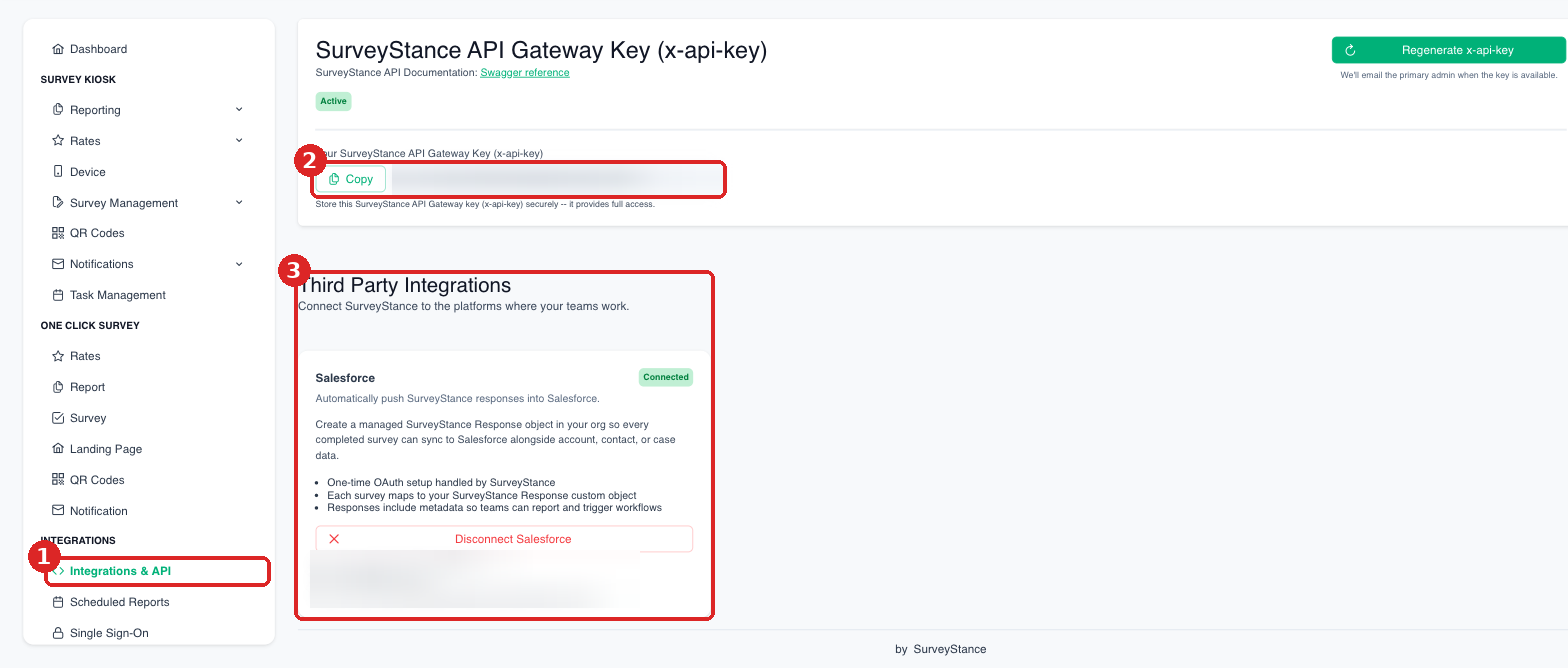
(1) Integrations > Integrations & API. (2) Copy your API key here (hidden in this screenshot). (3) Connect third-party apps like Salesforce.
Each key is unique to your account. Store it securely and never share it publicly.
Developers can find endpoint details in the Swagger reference linked on the same page.
Third-party integrations
The same page lists available integrations and their connection status. Setup guides: